3 Reasons Enterprise SQL Server Migrations Slow Down – and How to Avoid Them
July 1, 2026Smoke Test Microsoft Foundry Agents with GitHub Actions
July 1, 2026

There is a moment, the first time you open a GitHub Copilot App Canvas, when you reach for the wrong metaphor. You see panels, buttons, live status cards and you think “dashboard.” You start designing a DevOps board. We did exactly that. Then we watched the recording back, and we all agreed: it was the wrong use case.
This post is the course‑correction. It walks through one complete scenario on a Multi‑Agent Dev Canvas and uses it to answer a single question: what is Canvas actually for? The short answer, Canvas is for test validation and implementation of agent‑driven solutions, not for building the UI your users will eventually click.
The reframe that changes everything
Here is the distinction worth tattooing on your monitor:
- Traditional UIs are for using software. They serve end‑users interacting with a finished product.
- Canvas is for shaping software while it runs. It serves developers and AI agents who are actively building, testing, and evolving a system.
You don’t build Canvas instead of your UI. You use Canvas to figure out, test, and evolve the UI and the system before and during building it. Canvas solves problems your final UI should never try to solve in a visible way, agent observability, fault injection, live state mutation, validation feedback. You wouldn’t ship your debugger to users, but you absolutely need one while you build. Canvas is that, for agent‑driven systems.
The scenario: a Customer Support Triage System
To make this concrete, we drove one requirement end‑to‑end on the canvas:
Build a Customer Support Triage System that ingests incoming support tickets, classifies urgency (P1–P4), routes each ticket to the right team (Billing, Technical, Account, General), and drafts a first‑response reply. It must handle 500 tickets/hour and respond within 30 seconds.
Five specialist agents share the surface — decomposer, executor, validator, designer, and tracker. Crucially, every action can be triggered two ways: a human clicking a button, or the AI calling invoke_canvas_action. Both mutate the same state and stream back to the same UI over Server‑Sent Events. Neither is privileged. That is what makes Canvas collaborative in a way a dashboard never is.

The canvas after the first validation run — two tests pass, two fail (Urgency Accuracy and Response Quality). The failure is visible in context, beside the agents and flows that produced it.
Five beats, one continuous loop
1. Decompose: make the plan visible
The requirement fans out into a task‑flow graph: five components routed from the decomposer to executor and designer agents, each carrying a pending badge. The decomposition isn’t hidden in a log you grep later, it’s on the surface the instant it happens.
2. Execute: watch the system breathe
Coordinating the agents lights their cards blue as work flows through the pipeline. The live timeline records every mutation with a timestamp — the system’s visible memory, shared by human and AI alike.
3. Validate: testing in context, not as an afterthought
We ran four evaluation tests directly on the surface:
| Test | Result |
|---|---|
| Urgency Accuracy (≥ 90%) | ❌ fail |
| Routing Correctness (≥ 95%) | ✅ pass |
| Latency SLA (< 30s @ 500/hr) | ✅ pass |
| Response Quality | ✅ pass |
The classifier failed, and we saw it fail next to the agent and the flow that produced it. This is not a separate CI pipeline; it is a validation surface embedded in the development loop.
4. Inject failure: test adaptation, not just the happy path
We forced the validator into an error state: “eval harness lost connection to the dataset.” Its card glowed red; the timeline logged the fault. This is chaos engineering applied during development, visible in real time. Does the orchestrator recover? Do downstream tasks fail gracefully? You find out before production does.
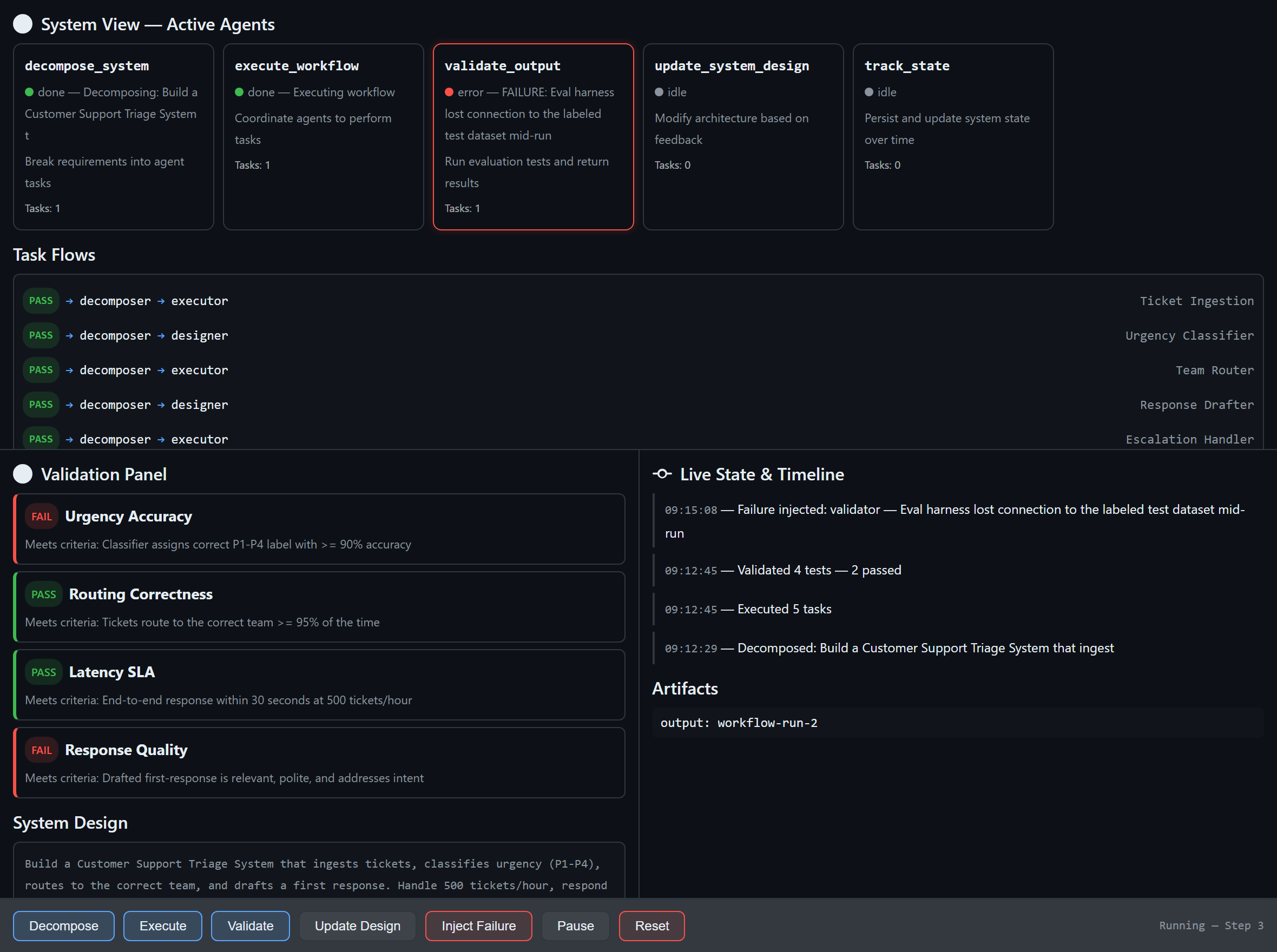
Fault injected: the validate_output agent is forced into an error state and the timeline records exactly when and why.
5. Evolve the design live: and close the loop
Instead of filing a ticket and context‑switching, we changed the system on the running surface: added a confidence‑fallback so low‑confidence tickets escalate to a human, and a GDPR constraint to redact PII before any model call. We resumed and re‑validated:
| Test | Result |
|---|---|
| Urgency Accuracy (re‑run) | ✅ pass |
| Confidence Fallback | ✅ pass |
| GDPR Redaction | ✅ pass |
A design decision produced a measurable outcome. We saw it fail, changed the design, and proved the fix — all on one surface, without leaving the runtime. That continuous, visual feedback loop is the whole point.
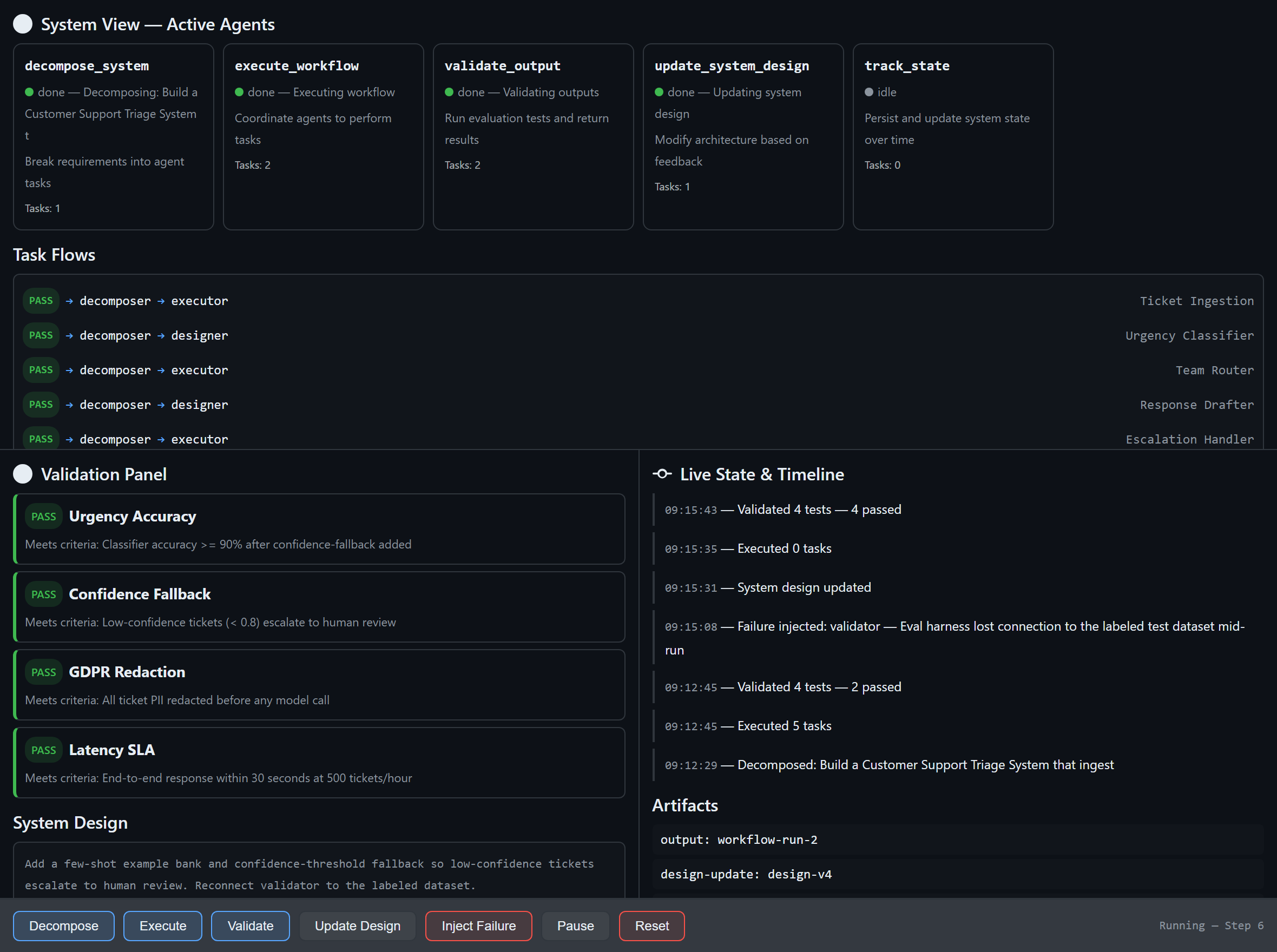
After evolving the design (confidence fallback + GDPR redaction) and re‑validating: all four tests pass. The timeline tells the whole story — decompose → validate (2 passed) → failure injected → design updated → validate (4 passed) — and a design-v4 artifact is recorded.
What this scenario proves about Canvas
- End‑to‑end design is visible. One requirement becomes agents, flows, and validations you can watch — no jumping between editor, terminal, test runner, and monitoring dashboard.
- Multi‑agent collaboration is observable. Hand‑offs, pending work, and bottlenecks are on the surface — the insight you need to debug orchestration but would never expose in a production UI.
- Fault tolerance is testable on purpose. Inject failures and watch adaptation, catching integration breaks early.
- Iteration is validation‑driven. Define criteria, run, see failures, evolve, re‑run — a loop, not a checklist.
Human ↔ AI ↔ System — and the multi‑user frontier
It helps to position Canvas against tools you already know:
- Figma is Human ↔ Human. A shared visual surface — but nothing executes. It’s design.
- Traditional UIs are Human ↔ System. Users interact with finished software.
- Canvas is Human ↔ AI ↔ System. A shared surface where things actually execute. The developer steers, the AI acts, the system evolves — all visible, all live.
Which raises the obvious next question: why isn’t Canvas multi‑user, scoped per project or repo? It already has every ingredient — it’s a shared space, it’s visual, it’s collaborative, and multiple participants (human and AI) act on the same surface. A repo‑scoped, multi‑participant Canvas would become a shared runtime where a whole team observes and shapes an agent system together. That is the compelling frontier. Today the main blocker to wider experimentation is licensing, not the idea — and that’s worth fixing, because the idea is good.
The bigger picture
Canvas redefines software development by shifting from writing static code to orchestrating living systems, where developers and AI co‑create, observe, and evolve solutions in real time. Instead of building UIs for users, we build interactive environments for agents — turning debugging, testing, and execution into a continuous, visual feedback loop that accelerates innovation and brings ideas to production faster than ever.
The triage system here is just one example. The pattern applies anywhere you build agent‑driven software: AI orchestration, workflow automation, data pipelines, autonomous services. Anywhere you need to see, steer, and validate a complex system as it runs — that’s where Canvas belongs. Not as the board you ship, but as the runtime you shape it in.
Try it yourself
- Reload the extension:
extensions_reload - Open the canvas:
open_canvas({ canvasId: “multi-agent-dev”, instanceId: “dev-1” }) - Drive the five beats — Decompose → Execute → Validate → Inject Failure → Update Design → Validate — by clicking, or with
invoke_canvas_action.
Full walkthrough: scenario.md. Reusable demo prompt: canvas‑showcase‑prompt.md. Companion deep‑dive: Canvas Is Not a UI Builder.
Resources
- copilot-canvas-runtime — this repository (extension, scenario, and prompts)
- GitHub Copilot Documentation
- Microsoft Foundry Documentation